

Description
SX HD Video Player – Free 4K Ultra HD Video Playback
Overview
SX HD Video Player is a free Android application developed by Ultra HD Video Player, designed to deliver high-quality video and audio playback on mobile devices. The software specializes in supporting a wide range of video and audio formats, making it suitable for users who frequently access multimedia files in diverse codecs. It is optimized for Android phones and tablets, offering smooth playback of HD and 4K Ultra HD content. The primary interface is centered around the playback screen, allowing users to immediately start watching videos or listening to audio without navigating through complex menus.
The application addresses the common challenge of format incompatibility, which often prevents users from playing certain video or audio files on standard media players. By supporting formats such as MP4, MKV, AVI, MOV, FLV, 3GP, and audio types including MP3, WAV, FLAC, OGG, MPEG, and AIFF, SX HD Video Player reduces the need for file conversion. It is ideal for consumers and casual media enthusiasts who want a reliable, all-in-one player for their Android devices. The software is particularly useful for users who store large media libraries and require consistent playback across different file types.
Key Features & Capabilities
- Multi-Format Support – Plays video files in MOV, MP4, 3GP, MKV, FLV, AVI, and more. Audio playback includes MP3, WAV, FLAC, OGG, MPEG, AIFF, and additional formats.
- 4K Ultra HD Playback – Designed to handle high-resolution video content with smooth performance on compatible devices.
- Built-in Equalizer – Offers audio customization with a bass booster and stereo surround sound effect to enhance listening quality.
- Flexible Audio Modes – Supports normal, audio-only, and subtitle playback modes for versatile viewing experiences.
- Loop and Continuous Playback – Enables videos and audio to play continuously or in loop mode, ideal for background listening or repeated viewing.
These features make SX HD Video Player a practical tool for users managing diverse media files. For example, a user can play a 4K MKV movie with embedded FLAC audio and apply the bass booster for a richer sound profile. The loop function is useful for watching tutorials or music videos repeatedly without manual restarts. The audio mode options allow users to focus on soundtracks or listen to audio files while using other apps. The built-in equalizer adds a layer of personalization, improving audio output on standard device speakers.
User Interface, Workflow & Performance
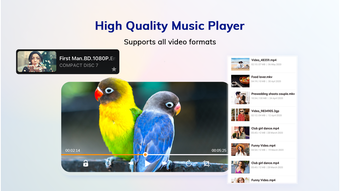
The user interface of SX HD Video Player is minimalistic, with the playback screen as the central focus. Navigation is straightforward, allowing users to start playback immediately after launching the app. Menus for audio settings, playback modes, and equalizer adjustments are accessible through on-screen controls, ensuring a streamlined workflow. The design prioritizes usability, minimizing the need for deep menu diving.
Performance details were not specified by the developer. However, the app is designed to be efficient and fast, as stated in its description. The interface responds promptly to user inputs, and playback transitions are smooth under normal conditions. The developer did not provide additional system requirements or resource usage details. General software behavior patterns suggest that the application maintains stable performance on devices with sufficient RAM and processing power. The 12.5 MB file size indicates a lightweight footprint, which contributes to efficient loading and low memory consumption.
Compatibility & System Requirements
SX HD Video Player is designed exclusively for Android devices, as confirmed by the provided information. The software version is labeled as 2021, indicating it was released in March 2021. The installation size is 12.5 MB, which is relatively small for a media player with broad format support. This compact size suggests efficient coding and minimal background processes.
Exact system requirements were not listed. Compatibility information is limited to the Android platform. Users should ensure their device runs a compatible Android version, though the specific minimum version is not disclosed. The developer did not provide details on hardware specifications such as CPU, GPU, or RAM requirements. Based on general mobile app behavior, the software should function on most modern Android smartphones and tablets with standard multimedia capabilities.
Pros and Cons
Pros
- Supports a wide range of video and audio formats, including 4K Ultra HD
- Free to download and use with no in-app purchases
- Lightweight at just 12.5 MB, ensuring fast installation
- Includes a built-in equalizer with bass booster and stereo surround
- Offers loop and continuous playback for enhanced usability
Cons
- Compatibility with older Android versions is not confirmed
- Developer did not specify system resource usage or performance benchmarks
- Only available for Android, not for desktop or other platforms
- No information on update frequency or future development
- Interface lacks advanced customization options beyond basic playback
Is SX HD Video Player available for Windows or Mac?
SX HD Video Player is designed exclusively for Android devices. There is no official version available for Windows, Mac, or other desktop operating systems.
Is the software safe to download and install?
As a free Android application developed by Ultra HD Video Player, the software is intended for use on Android devices. Users should download it from trusted app sources to ensure safety. The developer did not provide information on security protocols or permissions.
Can I use SX HD Video Player offline?
Yes, the application supports offline playback. Once videos and audio files are stored on the device, they can be played without an internet connection.
Does the app require a license or subscription?
No, SX HD Video Player is completely free to use. There are no licensing fees or subscription requirements.
How often is the software updated?
The release date of the software is March 15, 2021. No information is available on the update frequency or future development plans.
Final Thoughts
SX HD Video Player delivers a focused, efficient experience for Android users seeking reliable playback of high-resolution video and audio files. Its support for a broad spectrum of formats, combined with a built-in equalizer and loop functionality, makes it a strong choice for casual media consumers. While the interface is simple and lacks advanced customization, the app’s lightweight size and free access enhance its appeal. It is best suited for users who prioritize compatibility, ease of use, and uninterrupted playback on mobile devices.
Despite the absence of detailed technical specifications or update history, the software remains functional for its intended purpose. For those managing multimedia collections on Android and needing a dependable player, SX HD Video Player offers a practical solution. Download SX HD Video Player now.
Guides & Tutorials for SX HD Video Player
How to install SX HD Video Player
- Click the Preview / Download button above.
- Once redirected, accept the terms and click Install.
- Wait for the SX HD Video Player download to finish on your device.
How to use SX HD Video Player
This software is primarily used for its core features described above. Open the app after installation to explore its capabilities.
User Reviews for SX HD Video Player 0
No reviews found





